Platform

ADAM

Validate EBA supervisory reporting exactly as the Data Point Model defines it, and manage the rules that do it.

Request a demo

The supervisor should not be the first to find the error

EBA reports fail on validation rules that generic tools check partially or not at all: consistency between templates, rules that exist only in one release, the semantics of the DPM. Each failure found after submission means a resubmission.

ADAM (Advanced DPM Analysis Mechanism) works directly on the DPM and its validation logic. It runs the validation rules of the EBA and the extra data quality checks of the ECB (EGDQs) on your report files. The list of supported DPM-XL rule sets keeps growing as more authorities converge to this standard.

What it does

  • Runs the official rules. Validates XBRL-XML and xBRL-CSV reports against the DPM and its DPM-XL validation rules: structural, dimensional and semantic, including checks between templates.
  • Manages your validations. ADAM Validator, the flagship web application, has a task manager to run validations and tools to manage DPM-XL rules, including the ones you write.
  • Follows the releases. Works across DPM releases. A new release is loaded as it is published, with no rules to rewrite.
  • Fits your pipeline. Available as a web application, a library and an API.

How it differs

  • Every validation. Some tools built on other standards do not include all the validation rules. ADAM runs any DPM-XL validation and is systematically tested with the rules from the EBA and the ECB.
  • Native to the DPM. ADAM reads the rules in DPM-XL, the language they are published in. Nothing is translated into another rule language, so nothing is lost or late.
  • Built on the DPM, where generic validators are built on the taxonomy. A generic XBRL validator checks that a file conforms to the taxonomy. ADAM works on the DPM metadata, which allows data quality checks and checks between templates.

What it is for

Four things ADAM does

Validate before you submit

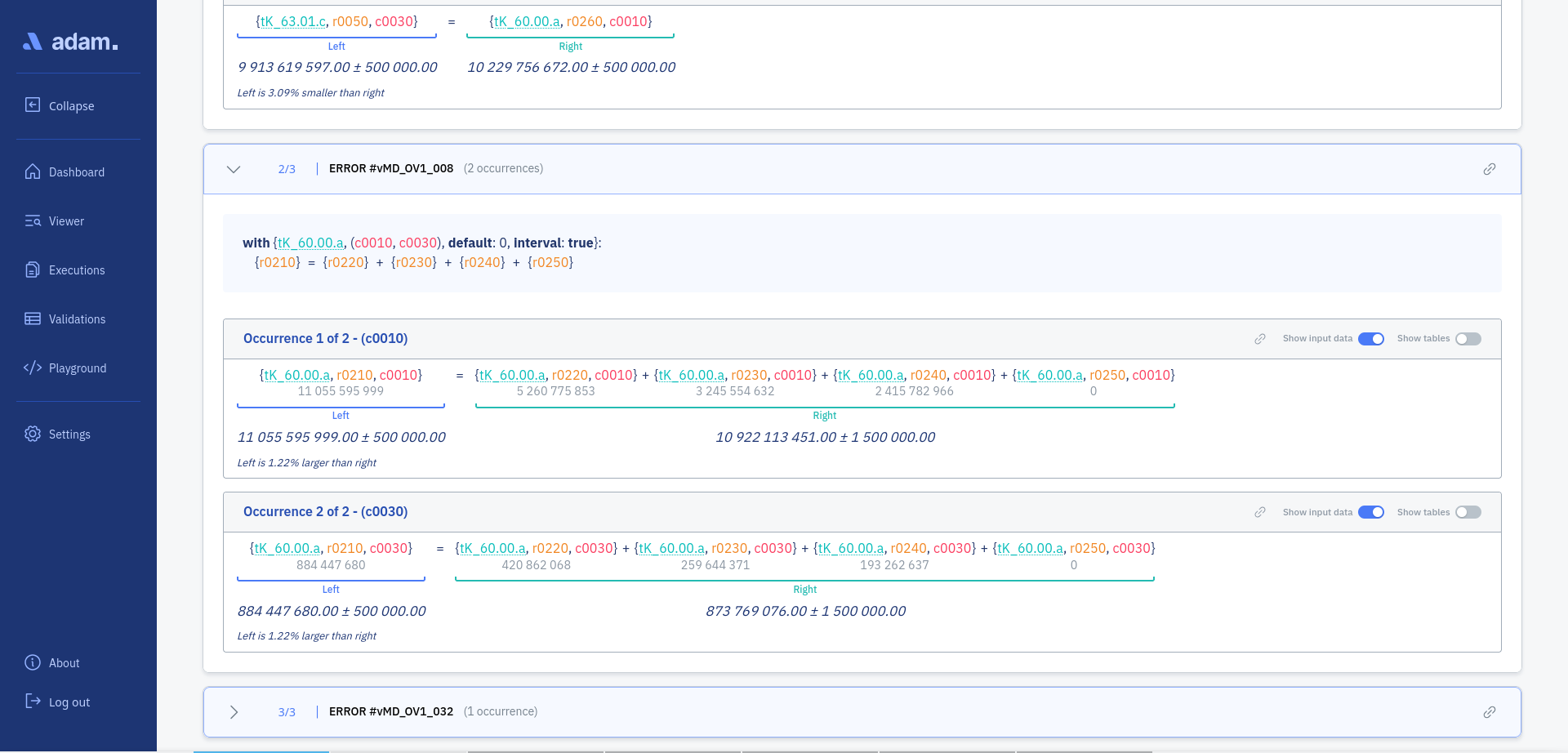
Run the rules on the file your reporting system produced. Each finding names the template, row and column, the values and the rule expression.


Validate what you receive

Supervisors run the same rules on the reports that arrive, institution by institution.

Write and run your own validations

Manage your own rules in DPM-XL next to the official ones: national rules for a supervisor, internal checks for a bank.

Embed DPM validation

Call ADAM from your own product or pipeline through its library or API.

Who it is for

Three kinds of teams use ADAM

Supervisory data teams

Data quality leads at authorities who receive EBA reports and maintain their own rule sets.

Regulatory reporting teams in commercial banks

Teams that want the supervisor's checks before the deadline, whatever tool produced the file.

Software vendors and partners

Reporting software vendors and consulting firms that need DPM validation inside their own products and projects.

How it works

From file to findings

  1. Load the report

    An XBRL-XML or xBRL-CSV file, through the web application or the API.

  2. ADAM reads the DPM

    The report is matched to the DPM release and module it was filed under.

  3. The rules run

    Structural, dimensional and semantic checks, including the DPM-XL rules that compare templates.

  4. You review the result

    Each finding with its cells, the values and the rule, ready to pass to whoever owns the figure.
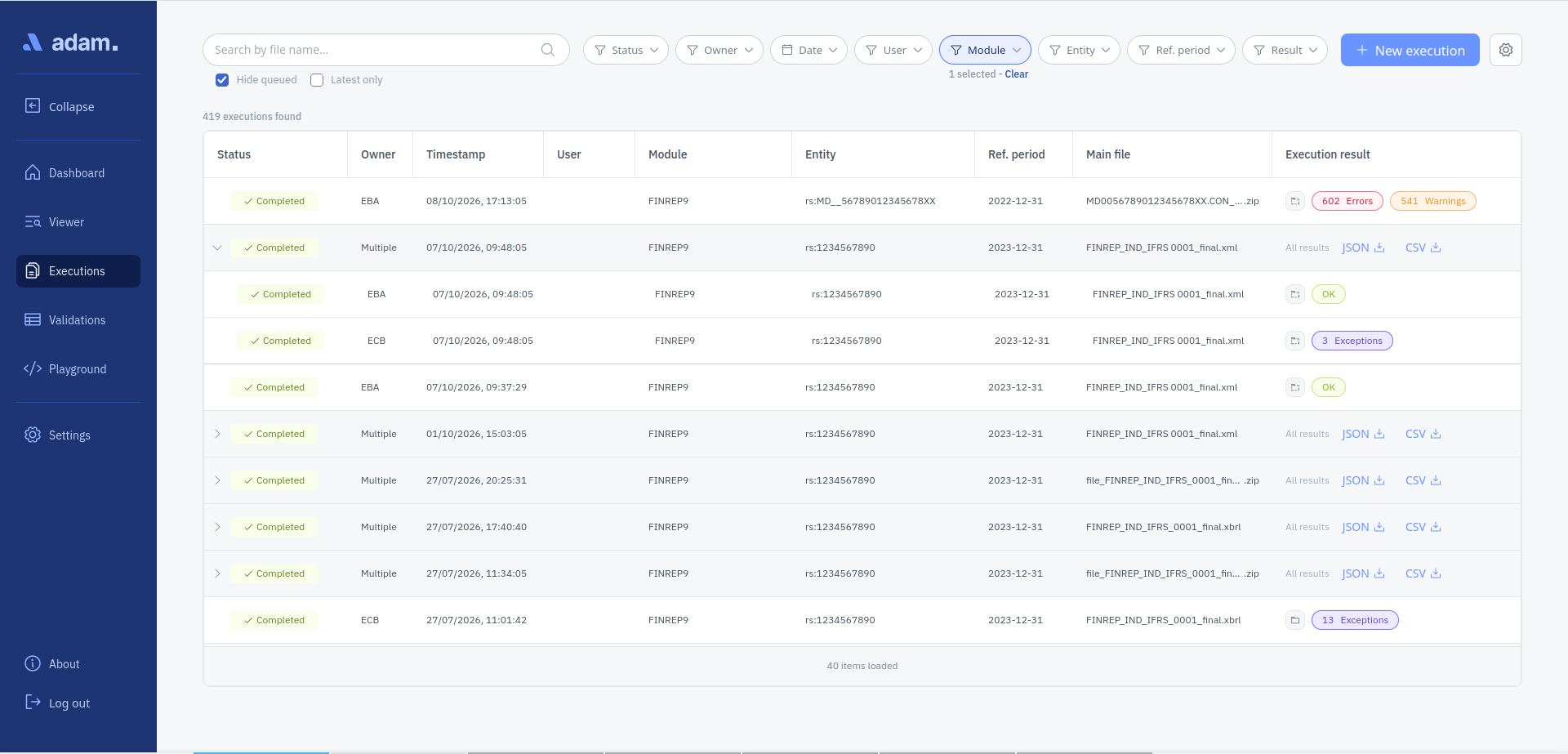
ADAM executions list with each run, its module, entity, reference period and result: errors, warnings, exceptions or OK
Executions: every run with its module, entity, reference period and result.
ADAM showing a failed validation rule with each occurrence, the cells involved and the values on each side
A finding: the rule, each occurrence, the cells and the values on both sides.
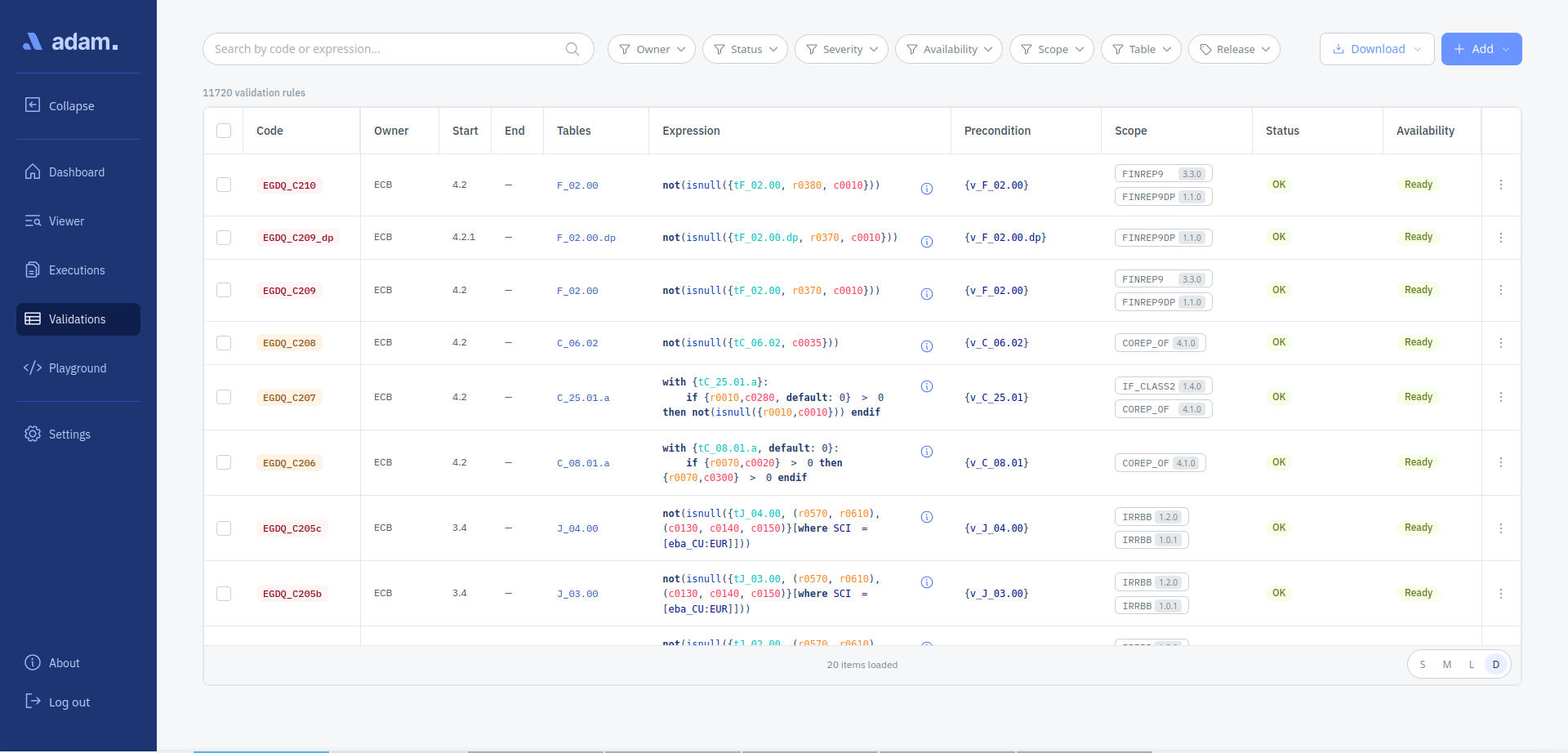
ADAM list of validation rules from the EBA and the ECB with their expression, tables, scope, status and availability
Validations: the EBA and ECB rules with their expression, scope and release.
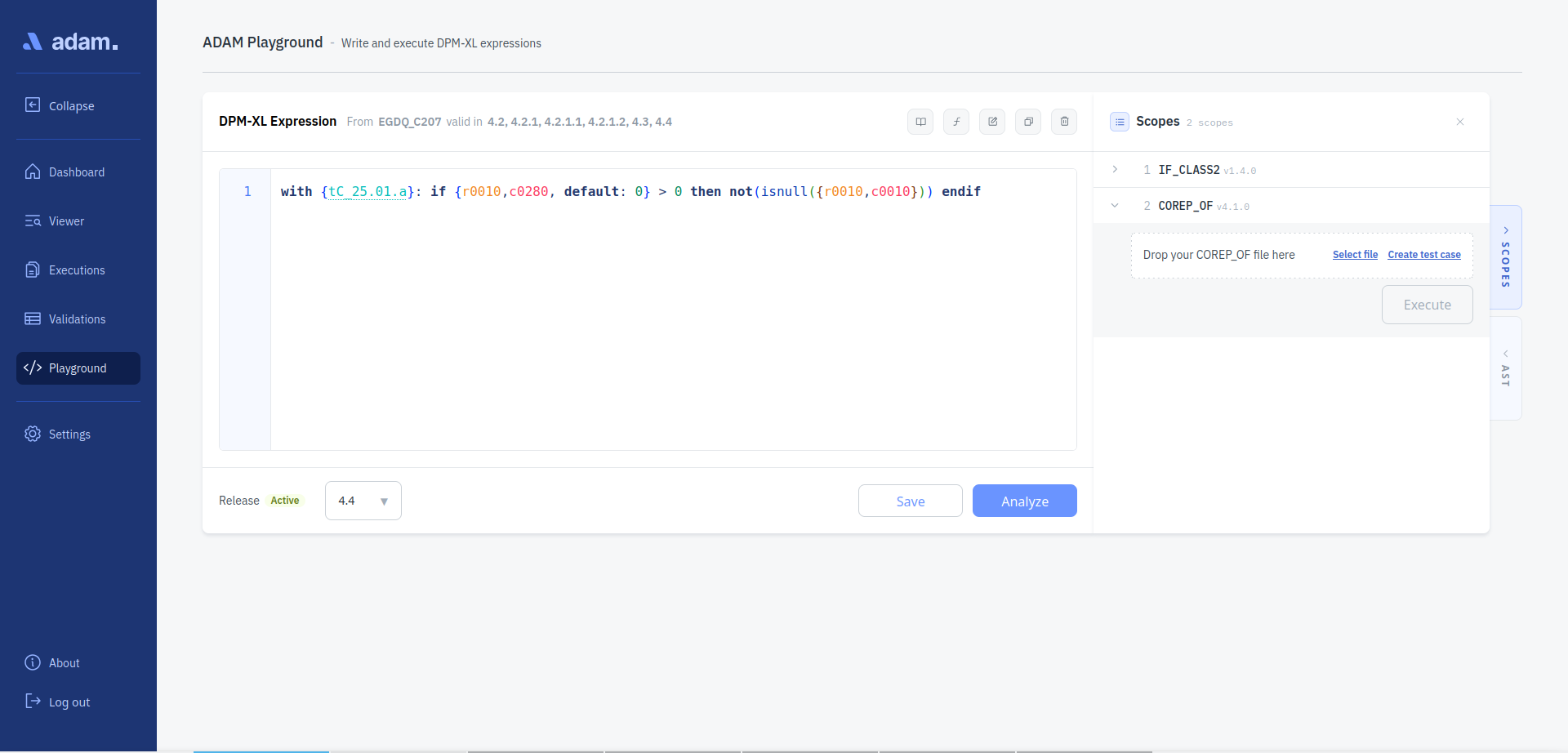
ADAM Playground with a DPM-XL expression in the editor and the scopes where it can run on a file
Playground: write a DPM-XL expression and run it on a file.

Questions

What buyers ask us

Which file formats does ADAM read?

XBRL-XML and xBRL-CSV instance data for EBA reporting. The conversion between the two uses XBridge, our open source converter.

Which DPM releases does it cover?

ADAM works across DPM 1.0 and DPM 2.0 releases, and takes each new release as it is published.

Can we add our own validation rules?

Yes. ADAM Validator manages DPM-XL validations, including rules you write yourself.

Can we try something before a demo?

Yes. ADAM Explorer is free and shows every EBA validation rule with its expression and release history.

Now is the time for compliance and data automation.

We can help you with both.

Request a demo Ask a question

Direct contacts

Social networks

Offices

Salamanca
Calle Concejo 9 1º D
37002 Salamanca

Madrid
Calle Fernando El Católico 86 posterior local C-12
28015 Madrid